
Framer AI Review 2026: Features, Pricing & Honest Verdict
Quick Verdict: Framer occupies a unique spot in the website builder market. It's the tool designers actually want to use. The AI page generation (launched 2024, significantly improved in 2026) generates visually impressive multi-section pages from text prompts in under a minute. But calling Framer an "AI website builder" undersells what it actually is: a professional-grade design tool that now happens to have AI features. If you want push-button website creation, Wix or Hostinger will get you there faster. If you want a site that looks like a designer built it, and you're willing to spend an afternoon learning the editor, Framer delivers. 4.5/5 — Best-in-class design quality, but the learning curve is real. Not for everyone.
Framer AI vs Competitors: Quick Comparison
| Feature | Framer | Webflow | Wix Studio | Canva | |---------|--------|---------|------------|-------| | Best for | Design-forward sites | Complex content sites | Business + ecommerce | Simple pages | | Starting price | Free ($5 Mini) | Free ($18 Basic) | Free ($22 Core) | Free ($15 Pro) | | AI page generation | ✅ Full pages | ⚠️ Limited | ✅ Yes | ✅ Yes | | Design control | High | Very high | Medium | Low | | Learning curve | Medium | Steep | Easy | Very easy | | CMS | ✅ Built-in | ✅ Powerful CMS | ✅ Built-in | ❌ No | | Custom code | ✅ Yes | ✅ Yes | ⚠️ Limited | ❌ No | | Export/Self-host | ❌ No | ✅ Yes | ❌ No | ❌ No |
How We Tested Framer AI
I built three different sites with Framer over one week to evaluate the AI features and the overall builder experience. No prior Framer experience. I came in as a newcomer to isolate the onboarding experience.
Testing setup:
- Account: Basic plan ($15/month)
- Sites built: A SaaS landing page, a designer portfolio, a small marketing agency site
- AI prompts tested: 12 different page-generation prompts ranging from "modern SaaS landing page with dark theme" to specific prompts like "consulting firm homepage with team section, services grid, and case study carousel"
- Time per site: Tracked from first prompt to publish-ready
- Comparison tools tested simultaneously: Webflow, Wix Studio for same site briefs
The goal was to answer one question: can a non-designer produce a professional-looking website with Framer's AI, or does it still require design skills?
Core Features Deep-Dive
AI Page Generation
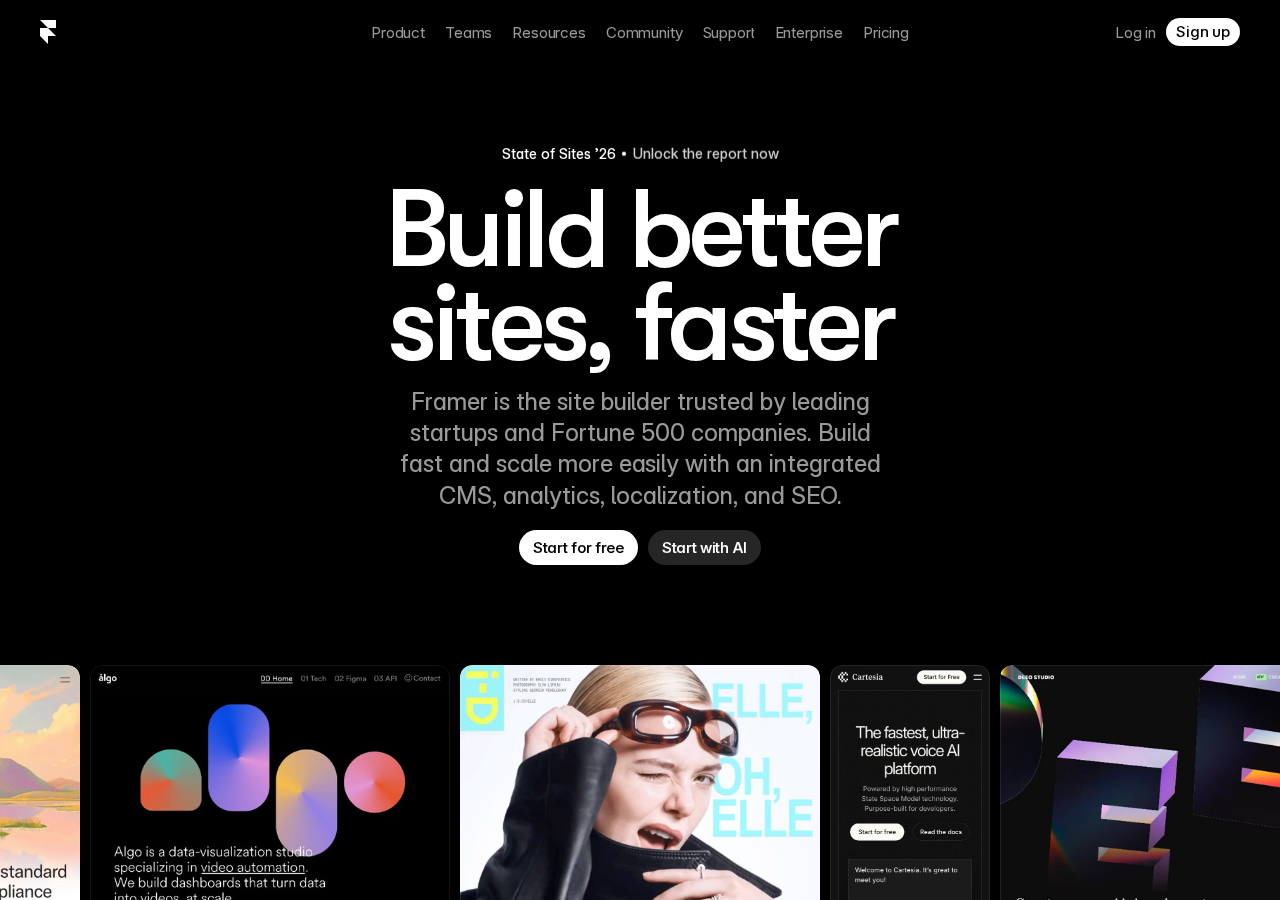
Framer's AI page generator is the headline feature. You type a description of the page you want, pick a style direction from visual examples, and Framer generates a complete multi-section page in 30-60 seconds.
The output quality surprised me. The generated designs have proper visual hierarchy, consistent spacing, good typography choices, and color schemes that actually work together. This isn't template-swapping. The AI builds unique layouts each time.
What the AI gets right:
- Layout structure and section ordering (hero → features → testimonials → CTA → footer)
- Typography pairings that work (heading fonts vs body fonts)
- Spacing and visual balance: sections feel properly proportioned
- Color palette generation: the AI picks coherent color schemes based on your prompt
What the AI gets wrong:
- Content placement: it often puts "lorem ipsum" or generic filler text in the wrong section types
- Specific layout requests: if you ask for a "3-column grid with icons above text," you might get icons beside text instead
- Interaction design: the AI doesn't generate hover effects, scroll animations, or interactive components
- Mobile responsiveness: AI-generated sections sometimes break on tablet widths and need manual adjustment
The AI is best used as a starting point, not a finish line. For my SaaS landing page, the AI generated a solid foundation in 45 seconds that I then spent about 2 hours tweaking: adjusting content, fixing mobile breakpoints, and adding custom interactions.
The Visual Editor
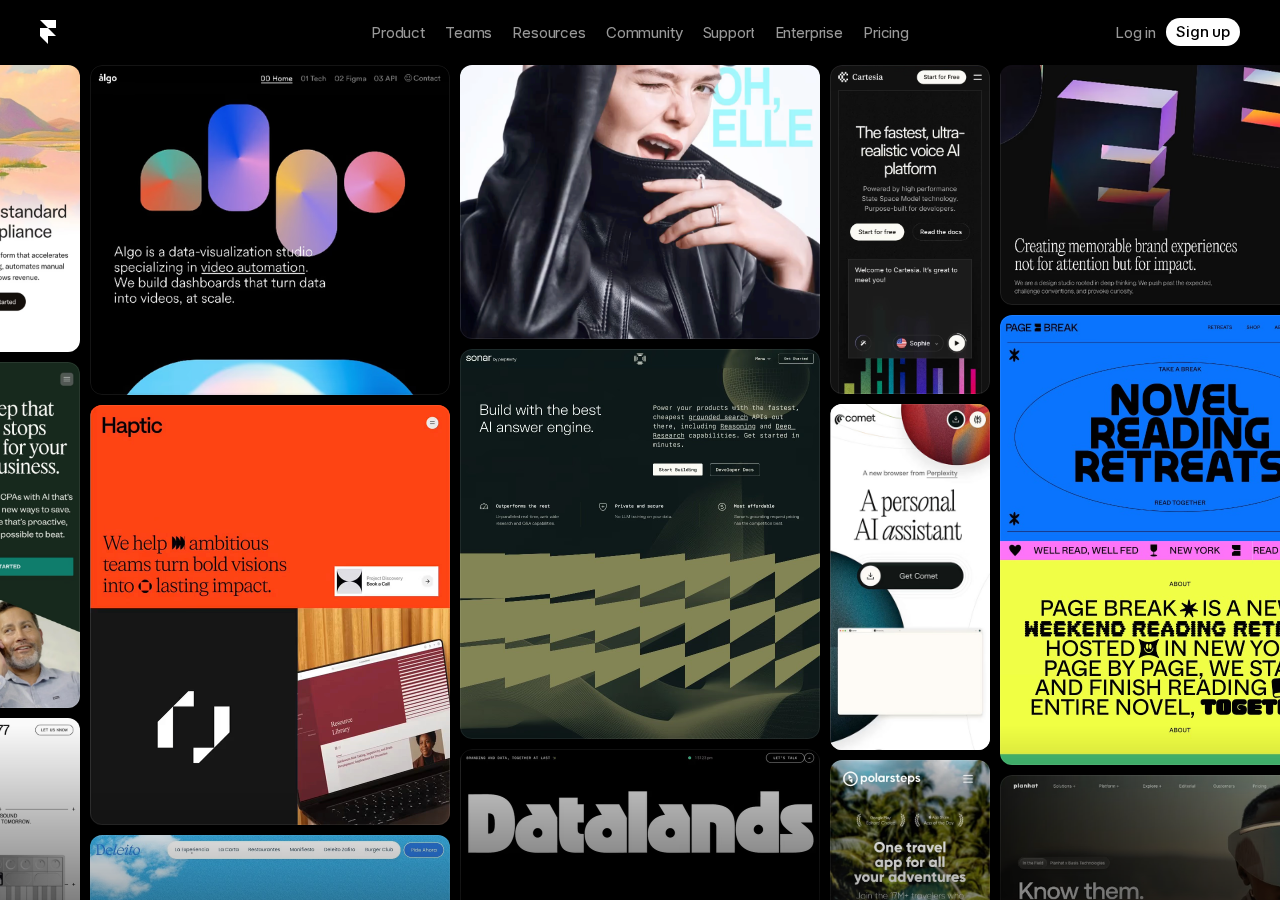
Framer's editor is where the product really shines. Think Figma but for actual websites. You get a canvas with frames, stacks, constraints, and a component system that will feel immediately familiar to anyone who's used Figma.
Key editor features:
- Flexbox and Grid layouts: no drag-and-drop guesswork, you're working with real CSS layout primitives
- Component variants: create one button component with hover/active/disabled states
- CMS collections: define content types (blog posts, team members, case studies) and Framer auto-generates listing and detail pages
- Animations and interactions: scroll-triggered animations, hover effects, page transitions, all visual with no code
- Code components: write React for custom interactive elements when the visual tools aren't enough
The learning curve is the tradeoff. I came in with Figma experience and was productive within an hour. Someone without design tool experience will need 3-5 hours to understand frames, stacks, and constraints before they can build confidently.
AI Copywriting
Framer added AI copywriting in 2025: the ability to generate real text content for your website sections instead of lorem ipsum. This is separate from the page generation AI and works inline in the editor.
You select a text element, click "Generate with AI," describe what you want ("hero headline for a project management SaaS"), and Framer generates 3-5 options. You pick one and it populates the text with proper styling preserved.
The copywriting AI is decent for headlines and short descriptions. It produces marketing-typical copy: clear, benefit-focused, slightly generic. For longer body text or technical content, you'll want to write your own or use a dedicated AI writing tool.
SEO and Performance
Framer sites are fast. Pages are served from a global CDN with automatic image optimization. In testing, all three sites scored 90+ on Google PageSpeed Insights for both mobile and desktop.
SEO tools are adequate but not comprehensive:
- Custom meta titles and descriptions per page
- Alt text fields for images
- Automatic sitemap generation
- 301 redirects
- SSL included on all plans
Missing: custom schema markup (JSON-LD), canonical URL controls, hreflang tags, and granular robots.txt editing. These are available in Webflow but not Framer. For most marketing sites and portfolios, Framer's SEO tools are sufficient. For large content sites with hundreds of pages, the missing features become limitations.
CMS and Blogging
Framer includes a built-in CMS for dynamic content. You define collections (blog posts, case studies, team members) with custom fields (text, images, links, dates, rich text) and Framer generates listing pages and detail pages automatically.
The CMS is simpler than Webflow's but easier to use. I set up a blog with categories, author pages, and related posts in about 45 minutes. The AI can help generate CMS collection structures from a description, though the output needed some tweaking.
Blog limitations: no native commenting system, no scheduled publishing, and the rich text editor is basic compared to WordPress or Ghost. Framer's CMS is best for portfolios, case studies, and documentation. Not for content-heavy publication sites.
Real-World Use Cases
Use Case 1: SaaS Landing Page
A B2B SaaS startup needs a marketing site fast. Framer's AI generates a solid landing page structure in under a minute. The team spends 3-4 hours customizing content, adding their brand colors, and setting up a waitlist form. Total time to launch: roughly 4 hours. Comparable build time in Webflow: 2-3 days for the same quality.
Recommended plan: Basic ($15/month)
Use Case 2: Freelance Designer Portfolio
A freelance designer wants a portfolio site that looks custom, not templated. Framer's design-first approach and AI generation let them create a unique layout quickly, then refine every detail with the visual editor. The component system makes it easy to add 20+ project case studies with consistent formatting.
Recommended plan: Mini ($5/month) for a simple portfolio, Basic ($15/month) if you need CMS for case studies
Use Case 3: Small Marketing Agency Site
A 5-person marketing agency needs a site with service pages, case studies, team bios, and a blog. Framer's CMS handles the dynamic content, the AI generates initial page layouts, and the team's designer polishes everything. Total build time: about 2 days. Ongoing maintenance: 30 minutes per week for blog posts and case study updates.
Recommended plan: Pro ($30/month) for staging environment and higher visitor limits
Pros & Cons
Pros
- Best-in-class design output. Framer-generated sites look more professional than anything Wix, Squarespace, or Hostinger's AI can produce
- AI page generation is legitimately useful. Not a gimmick. It produces real, usable layouts in under a minute
- Visual editor is a joy to use. Figma-like interface with real CSS primitives under the hood
- Sites are fast. CDN, image optimization, and clean code output mean 90+ PageSpeed scores by default
- Components system is powerful. Design once, reuse everywhere with variants for different states
- CMS is straightforward. Good enough for portfolios, case studies, and simple blogs
- Transparent pricing with no hidden fees. All plans are month-to-month
- Free plan is fully functional. Build and publish on a framer.com subdomain with no time limit
Cons
- Learning curve for non-designers. 3-5 hours minimum before you feel comfortable
- No export option. Your site lives on Framer's hosting permanently. No HTML export
- AI content placement is hit-or-miss. Often puts generic filler in the wrong spots
- Limited CMS compared to Webflow. No scheduled publishing, no multi-reference fields, basic rich text
- No native ecommerce. You'll need to embed third-party solutions (Shopify Buy Button, Gumroad)
- Visitor limits on lower plans. 1,000 visitors/month on Free and Mini is low for any site with real traffic
- Mobile responsiveness needs manual checking. AI-generated sections sometimes break on tablet
Pricing Breakdown
Framer's pricing is straightforward but the visitor limits catch people off guard.
| Plan | Price | Visitors | CMS Collections | Custom Domain | |------|-------|----------|-----------------|---------------| | Free | $0/mo | 1,000 | 1 | ❌ framer.com subdomain | | Mini | $5/mo | 1,000 | 1 | ✅ | | Basic | $15/mo | 10,000 | 10 | ✅ | | Pro | $30/mo | 100,000 | 25 | ✅ | | Enterprise | Custom | Unlimited | Unlimited | ✅ |
Hidden costs to watch for:
- Visitor overage: If you exceed your plan's visitor limit, your site doesn't go down — Framer charges overage fees or prompts you to upgrade. Going from 1,000 to 2,000 visitors means upgrading from Mini ($5) to Basic ($15).
- CMS collection limits: The jump from 1 collection (Free/Mini) to 10 (Basic) to 25 (Pro) can force upgrades even if you're under visitor limits. A blog + portfolio + team page = 3 collections already.
- Team collaboration: If multiple people need edit access, each person needs their own Framer account. There's no "team plan" below Enterprise.
- Localization: Building a multi-language site requires separate pages per language, eating into your page limits. No native localization features.
Who Should Buy Framer (and Who Should Skip)
Buy Framer if:
- You have some design sensibility (or a designer on your team) and want a site that doesn't look like a template
- You need to launch a SaaS landing page, portfolio, or agency site quickly with professional results
- You're comfortable spending a few hours learning a visual editor in exchange for better design output
- You're a Figma user looking for a website builder that thinks the same way you do
Skip Framer if:
- You want push-button simplicity. Wix or Hostinger will get you online faster with less learning
- You need ecommerce built in. Shopify or Squarespace are purpose-built for selling
- You're building a large content site (100+ pages). Webflow's CMS is more mature for scale
- You might want to move your site to another platform later. Framer has no export, you'll need to rebuild
- You're on a tight budget and expect real traffic. The Mini plan's 1,000 visitor limit is very low
Frequently Asked Questions
How does Framer's AI compare to Wix's AI website builder?
Both generate sites from prompts, but the output is very different. Wix's AI produces functional, template-derived sites that look... fine. They work, but they have that "website builder" aesthetic. Framer's AI produces designs that look custom-made: better typography, better spacing, more visual personality. The tradeoff: Wix is easier to customize afterward (drag-and-drop), while Framer requires learning its Figma-like editor.
Can Framer really replace a web designer?
For simple marketing sites, landing pages, and portfolios: yes, for many use cases. Framer's AI + visual editor lets a non-designer produce a site that looks professional. For complex sites with custom interactions, unique layouts, or brand-specific design systems: no, you still need design skills. Think of Framer as a power tool that amplifies whatever design ability you have. Zero design ability = decent results. Some design ability = great results.
What happens to my site if Framer goes out of business?
Your site goes down, and you can't export it. This is the biggest risk with any closed-source hosted website builder. Framer (the company) is well-funded and growing, but the risk is real. If business continuity matters, Webflow offers HTML/CSS export on higher plans — Framer doesn't offer export at any tier.
Does Framer work for client projects?
Yes, Framer is popular with freelance designers and agencies building client sites. You can transfer site ownership to clients, set up client billing, and use the staging environment (Pro plan) to preview changes before publishing. The main limitation is that your client is locked into Framer's hosting. Some clients prefer owning their code.
How long does it take to learn Framer?
If you've used Figma, Sketch, or any design tool with frames and constraints: 1-2 hours to feel productive. If you're new to visual design tools entirely: budget 3-5 hours of focused learning. Framer's tutorials and documentation are well-made, and the AI can generate starting points while you learn. But there's no shortcut — the editor uses real design concepts, and you'll need to understand them.
Final Verdict
Framer occupies the space between "template website builder" and "professional design tool," and it occupies it better than anyone else. The AI page generation is more than a gimmick: it produces real, usable layouts that look custom, not cookie-cutter. The visual editor is legitimately enjoyable to use if you have any design inclination.
The main things holding Framer back are the learning curve (not everyone wants to learn Figma concepts to build a website) and the lock-in (your site lives and dies with Framer's platform). If either of those is a dealbreaker, look elsewhere.
For the right user (someone who cares about design quality, is willing to invest a few hours in learning, and is building a marketing site or portfolio), Framer is the best option available. The AI accelerates the process without dumbing down the output.
Rating: 4.5/5 — Excellent design tool with useful AI features. Not for everyone, but best-in-class for its intended audience.
This review was updated May 26, 2026. Pricing and features verified against Framer's public website. Three test sites built and evaluated for this review. Screenshots captured via automated browser testing.
